Nextcloud announced on November 13 that its free office suite, Nextcloud Office Desktop, is available to download. According to the company, you can edit documents stored on your computer even without an internet connection. Connect to Nextcloud, and you can also work on the same file online with colleagues. It’s an appealing option for people who exchange Word or Excel files and want to keep working even where the connection is unreliable. 1
Work with files stored on your computer first
The app is built on Euro-Office, an office suite developed and operated in Europe. Nextcloud says it provides editors for documents, spreadsheets, presentations, and PDFs. It’s free software with publicly available source code, distributed for Windows, macOS, and Linux. Because it’s an installed application, you don’t need to run a server or connect to the internet to edit local files. 1, 2
On its official download page, Nextcloud lists installers for Windows x64 and ARM64, Linux DEB and RPM, and Apple silicon Macs. Download and install the version for your computer, then open files stored on your device to work on them. The key point is that you can keep editing files already on your computer even if your internet connection drops. 1
Mac users should check their processor in particular. The macOS installer listed by Nextcloud is for Apple silicon. A user requesting an official build for Intel Macs posted a request to the public repository in October, and it is still marked as open. So don’t assume that an official installer will work on your device just because it’s a Mac. 1, 3
Nextcloud says the app offers high compatibility with Microsoft Office DOCX documents, XLSX spreadsheets, and PPTX presentations. It also supports open document formats such as ODT, ODS, and ODP. A practical first step is to make a copy of a file you already use, open it, and check it in the other person’s application after editing and sharing it back. 1, 4
Fonts are another thing to check. The app can use fonts installed on your computer, but according to Nextcloud, if the people you work with don’t have the same fonts, different ones will appear on their screens instead. 1
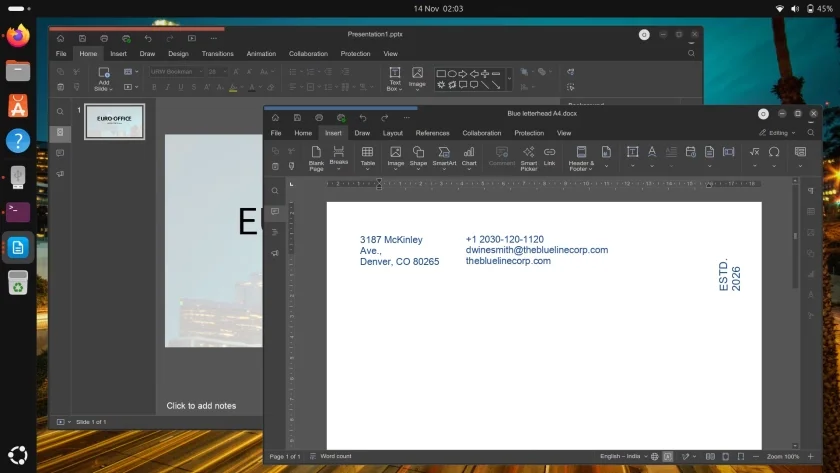
Image source · www.omgubuntu.co.uk
Connecting is necessary to edit with a team
Unlike working on files stored on your computer by yourself, simultaneous team editing requires an online workspace to share. Nextcloud says that connecting the desktop app to Nextcloud Hub, its file storage and sharing service, lets you open online files and edit them in real time, alone or with others. Colleagues can also join the same document from a browser or mobile device. 1, 4
Start the connection from the app’s Home tab. Click ‘+’ under ‘Clouds,’ select ‘Nextcloud,’ enter the address of the Nextcloud service you use, and sign in to your account. After connecting, you can select that workspace from the list. Nextcloud says you can connect multiple workspaces to one app. 1
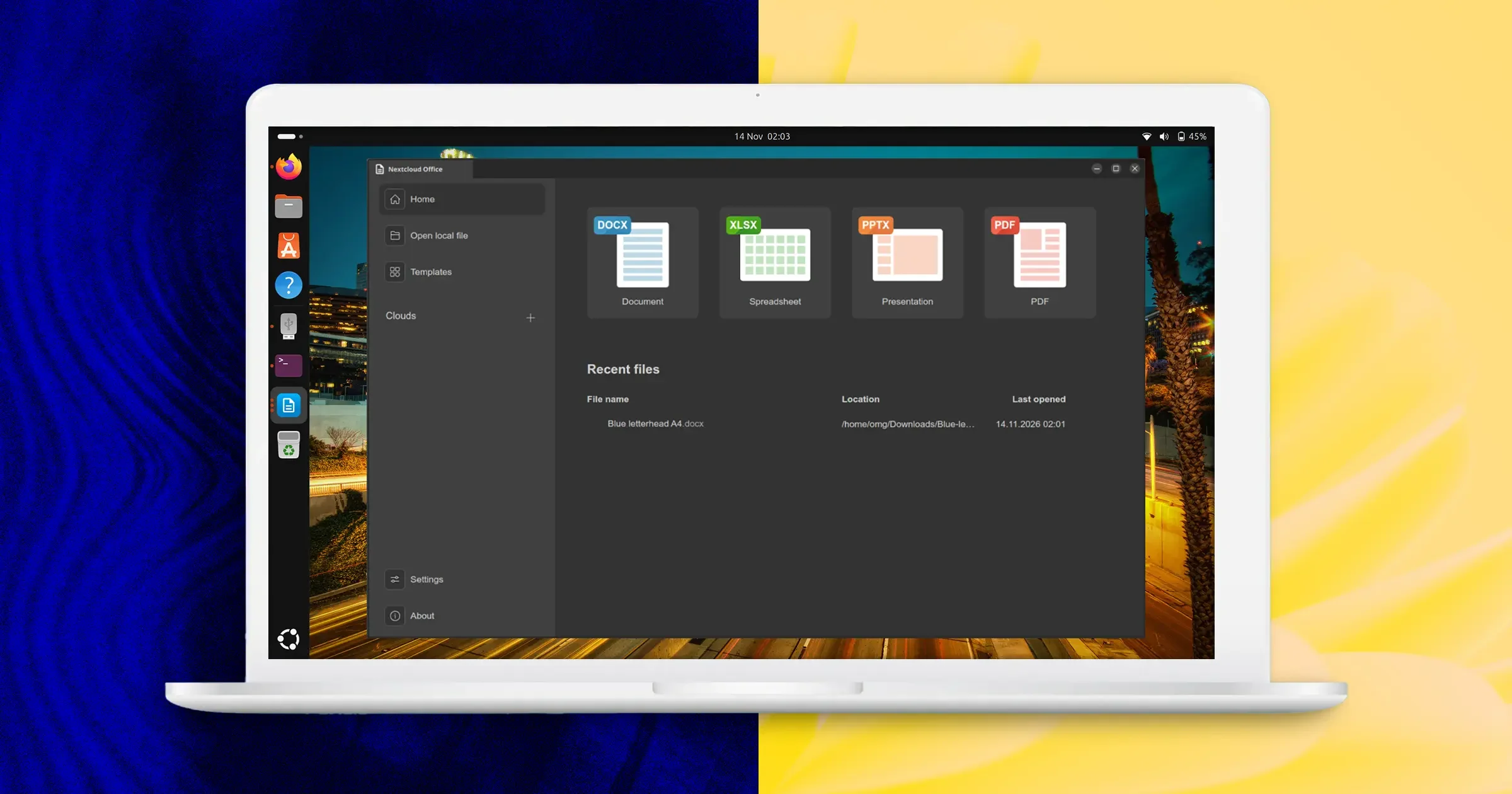
Image source · www.omgubuntu.co.uk
Nextcloud’s announcement doesn’t explain how files edited separately offline are merged after reconnecting. 1
The app also has features for signing documents and restricting access. According to Nextcloud, the signing feature in the ‘Protection’ tab lets you add digital signatures to documents, spreadsheets, and presentations, but you need a digital certificate first. From the same tab, you can set a password for a file or restrict what others can do—for example, allow them to comment, fill in forms, or edit with tracked changes. 1
A case of online editing overlapping with a separate upload
When sharing files, be careful about replacing a file through another route while it’s being edited. On August 24, a user report appeared in Euro-Office’s public repository saying that some data could be lost if an XLSX file being edited in a browser was replaced through a desktop sync app or web upload. The reporter wrote that the online editor did not show a conflict warning. 5
On October 27, a project contributor said they had reproduced a case where an uploaded file was overwritten when the online editor saved while still open. In that test, the uploaded content remained only in the file’s version history, and no warning appeared. They also clarified that they had not yet reproduced the “editing continues, but changes are no longer saved” symptom described in the original report. 5
The published tests used Euro-Office 11.0.6 and Nextcloud 33.0.5, among other components. Unless specifically noted, forced saving was disabled. In the results below, “file locking” refers to a setting that blocks uploads to a file while it’s being edited. HTTP 423 means the upload was rejected. 5
| Test scenario | File locking | Result |
|---|---|---|
| Upload while the editor is open, then close it 3 seconds later | Off | The upload is overwritten during the save process after closing; the uploaded version remains only in the version history |
| Close the editor, then upload 25 seconds later | Off | Uploaded version is retained |
| Upload while the editor is open | On | Upload is rejected, and the editor’s content is saved normally |
These results do not test editing offline in the new desktop office app and reconnecting afterward. They describe a conflict that can occur when online editing overlaps with a separate upload. A project contributor suggested file locking as a workaround, but it temporarily rejects uploads; it doesn’t automatically merge the two versions. If your team uses the app, it’s safer to check who has a file open and keep both the original and edited versions before uploading separately. 5
In closing
If you upload a separate copy of a file you’ve edited while a colleague is working on the document online, your upload may remain only in the version history. For important files, it’s safer to keep a copy of your changes and check whether the shared version is being edited before uploading. 5
Have you ever had trouble working on a document together because your internet connection dropped or you ended up with different versions?
References
- ↩
- Euro-Office, the ONLYOFFICE fork, now has a desktop app - OMG! Ubuntu · omgubuntu.co.uk↩
- ↩
- Nextcloud Office powered by Euro-Office · nextcloud.com↩
- ↩