
A developer running AI on a laptop connected to an external AMD graphics card reported that, after applying an AMD patch to llama.cpp, answer generation speed increased from about 35 to 55 tokens per second. llama.cpp is a program for running language models on your own computer, and tokens are the small units AI uses to process and generate text. The developer chose to start with a program designed to work across a range of hardware, then add a small set of changes tailored to AMD. 1
Two speeds measured with the same model
The developer’s test setup used an AMD R9700 connected to a laptop as an eGPU. An eGPU is a graphics card connected externally to a computer for processing. The model was the ukisai/Swift-1.5-Qwen3.8-27B-GGUF version of Q6_K_L, with MTP enabled, a feature that predicts multiple tokens in advance. This was a specific case involving a particular type of quantization—a way of storing models more compactly. 1, 2, 3
The reported figures are split into prefill, which processes the input, and generation, which produces the answer. Prefill is the stage where the AI first reads a question or a long piece of attached text. Generation speed is the rate at which it then writes its answer. All figures in the table are in tokens per second.
| Measurement stage | Before | After |
|---|---|---|
| Input processing · prefill | About 700 | About 1,300 |
| Answer generation | About 35 | About 55 |

By these figures, input processing was about 86% faster, while answer generation was about 57% faster. But input processing speed is not the same as how quickly an answer appears on screen. The difference may be noticeable in different ways when having the AI read a long document versus getting a long answer. The original poster also noted that results may vary from user to user. 1
This report alone does not establish that the same degree of improvement can be reproduced on other PCs. explainx.ai, which covered the case on November 26, 2026, noted that the original post did not disclose the full command used to run the test, the input context length, or the existing llama.cpp build used for comparison. The coverage date is confirmed, but neither the original post’s publication date nor the measurement date was provided. 1, 3
Why the developer chose a small patch set
llama.cpp, the underlying program, is used to run language models on a computer. Rather than rebuilding it from scratch, the developer chose llama-cpp-rdna-boosts, a project that adds changes for AMD graphics cards to a specific version of llama.cpp. A variant branched off from an existing program is commonly called a fork. The original poster liked that the changes were small and could be reapplied to newer versions of the underlying program. 1
Beyond speed, the developer looked at what was being changed to achieve it. Citing one example involving another inference engine, they expressed concern about an optimization that prioritizes an item already in graphics memory over the item the original model would have selected. By contrast, they described their chosen project as adding changes tailored to AMD hardware on top of the existing codebase. 1
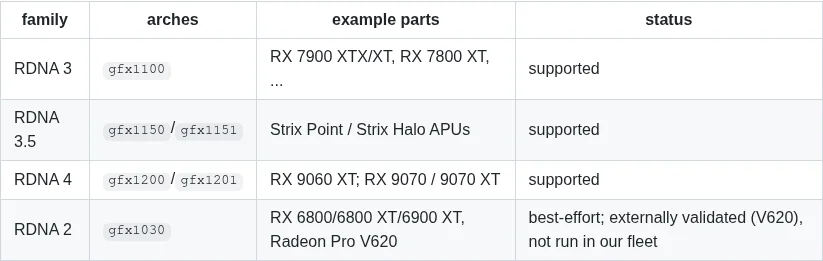
The project repository lists AMD’s RDNA 3, 3.5, and 4 families as supported. RDNA 2 is not officially supported, though it is supported where possible. The optimizations that apply vary by generation even among AMD cards, and the repository says RDNA 4 benefits the most. So checking the card model comes first. Having AMD in the name alone does not mean you can expect the same speeds as in this test. 4
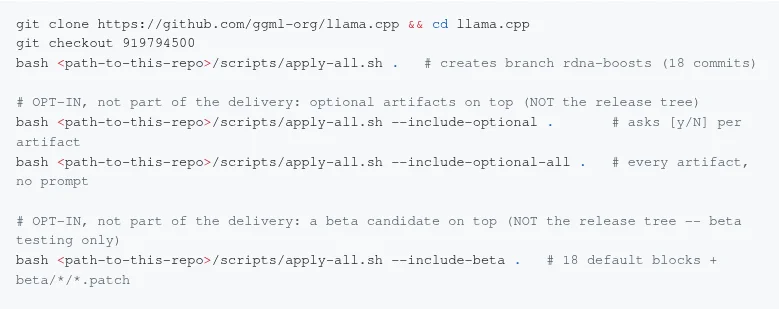
Instead of building the program themselves, the developer downloaded a prebuilt image and ran it with Podman. An image bundles a program and its runtime environment into a file, while Podman is a tool for running it in an isolated container. The original post includes commands for connecting the graphics device and model folder to the container, but says the actual launch script also used additional options. That is why the full test setup cannot be reconstructed from the few lines made public. 1
What to record when comparing results on your own computer
If you want to check this yourself, it’s a good idea to record a baseline using the existing llama.cpp first. Use the same graphics card and model file, quantization, input length, and settings, and note the prefill and generation speeds separately. Then measure again with the patched version. The model creator lists the original post’s Q6_K_L version as a 25.0 GB file. Switching to a smaller file changes the test conditions, making a straightforward comparison with the original figures difficult. 3, 1, 2
Record the versions too. This project applies patches to a fixed llama.cpp baseline and then updates that baseline. The repository provides release tags and identification files, so you can check which combination you used if you rerun the test later or share your results with others. That information is useful for determining whether a speed change came from the hardware or a software change. 1, 4, 3
It’s also worth comparing the answers, not just the speed. explainx.ai suggests asking both builds the same question and setting the temperature—a setting that controls randomness—to 0 before comparing their outputs. Getting the same result for one question doesn’t mean every answer will be equally good, but it can be a starting point for spotting noticeable differences. The project also documents tests for checking differences in output probabilities. 3
The repository notes a known bug in a separate beta server feature that can corrupt data when there are many concurrent requests, and says it is not included in the default distribution. 4
In closing
If local AI feels slow, you may get a different result by first recording your current input-processing and generation speeds separately, rather than changing the model right away. 1, 3
When using local AI, which takes longer for you: reading the input or generating the answer?
References
- AMD-specific fork of llama.cpp | devnull.land · devnull.land↩
- ukisai/Swift-1.5-Qwen3.8-27B-GGUF · Hugging Face · huggingface.co↩
- ↩
- ↩