If you have ever dealt with AI models or built automation workflows, you might have hit this wall at least once: "Ah, how on earth do I get GPT to cleanly read this PDF data (or Excel, or images)?"
The data is clearly vast and valuable, but when you try to hand it over to an AI, the formats are all over the place, forcing you to overhaul everything. I once spent countless nights in a recent project converting hundreds of Word files and Excel sheets into text one by one. Between writing Python scripts, combining libraries, and wrestling with broken layouts, you often end up exhausted before you even get to the actual "analysis."
However, as of 2026, encountering the tool released by Microsoft called MarkItDown has allowed me to break free from this tedious "data preprocessing bottleneck." Today, I want to share the fascinating story of why this innovative tool is being called an "essential tool for agents" by developers and data scientists.
The Swamp of Data Preprocessing: Why Do We Always Struggle?
When using AI models, especially Large Language Models (LLMs) like GPT-4o, the most important factor is "data quality." But reality is not so easy. This is because the knowledge we possess is scattered in the form of "unstructured data," such as PDFs, Word documents, Excel files, and even images or audio files.
The process of converting this data into a standard format that an AI can easily understand—Data Preprocessing—is the main culprit that consumes more than 80% of the total work time. It is not just a matter of scraping text. If the structure of a table breaks or the hierarchy of headings collapses, the AI loses context and provides nonsensical answers.
Previously, to solve this, one had to use tools like textract or build a custom converter by combining complex parsing libraries. However, as the number of file formats increased, the dependencies to manage exploded, and code complexity rose to unmanageable levels. It is much like spending an entire day just preparing ingredients when you intend to cook a meal.
The Emergence of MarkItDown: Magic That Turns Complexity into Simplicity
Entering the scene like a relief pitcher is Microsoft's MarkItDown. As the name suggests, this is a Python-based lightweight utility that converts various file formats into Markdown, the most versatile and structured text format.
Why is this tool receiving such intense interest? Beyond simply "being able to convert," it preserves the semantic structure of the document.
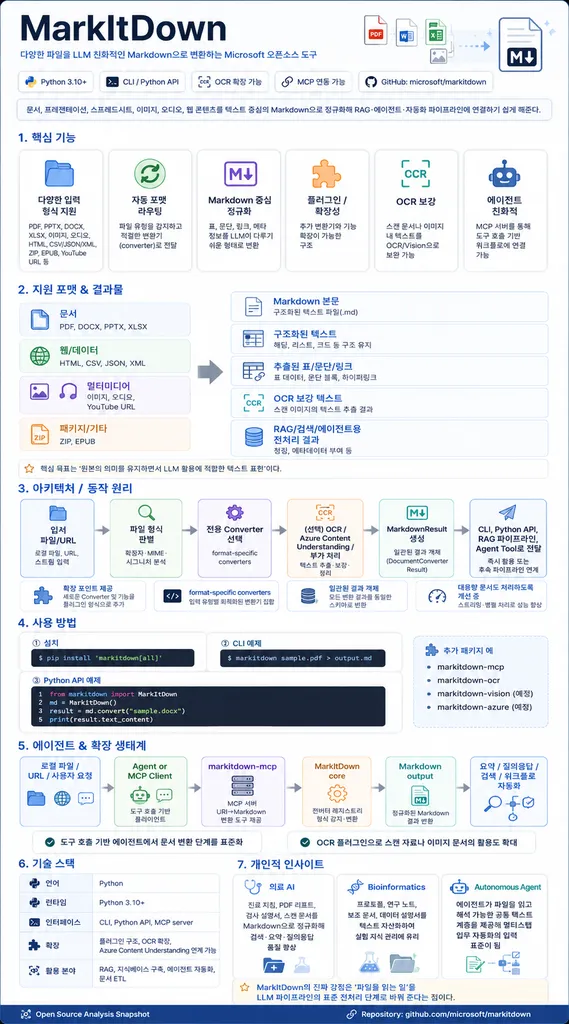
MarkItDown demonstrates remarkable versatility:
- Perfect Conversion of Office Documents: It precisely maps the tables and heading hierarchies of Word (.docx), Excel (.xlsx), and PowerPoint (.pptx) to Markdown syntax.
- Multimodal Support: When provided with an image, it extracts EXIF metadata, and if connected to an LLM (e.g., GPT-4o), it can even generate text describing the contents of the image.
- Media Processing: It includes features to transcribe speech from audio files into text or extract subtitles from YouTube URLs.
- Data Standardization: It refines data formats like HTML, JSON, XML, and CSV, as well as files inside ZIP archives, into Markdown all at once.
It is like having a "smart food processor" where you simply toss in a mountain of complex ingredients, and it immediately prepares them to be perfectly ready for cooking.
How to Use It? Just 4 Lines Are Enough
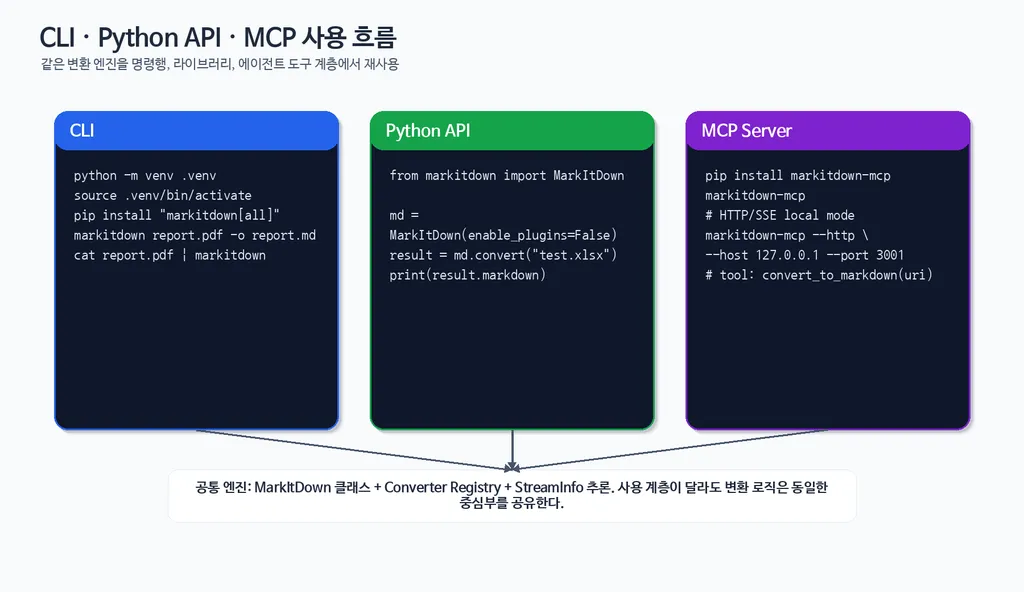
The greatest charm of MarkItDown is its "overwhelming simplicity." You can use it very intuitively in a Python environment without complex configurations. As of 2026, many developers are building data pipelines using this tool.
Let's look at the most basic usage:
from markitdown import MarkItDown

# Create a MarkItDown instance
md = MarkItDown()

# Convert a file to Markdown
result = md.convert("my_report.xlsx")

# Output the result
print(result.text_content)
Simple, right? If you want more powerful features, such as making an AI "read" the contents of an image, you simply need to connect an OpenAI client.
from openai import OpenAI
from markitdown import MarkItDown

client = OpenAI(api_key="your_api_key")
# Advanced conversion mode that includes image descriptions using GPT-4o
md = MarkItDown(llm_client=client, llm_model="gpt-4o")

result = md.convert("complex_chart.png")
print(result.text_content)
By doing this, you can obtain rich Markdown data that goes beyond simple OCR, capturing the meaning of charts and the context of images. This is exactly how AI agents understand the world.
Of course, nothing is perfect. There are clear precautions when using it:
- Security Issues: MarkItDown performs input/output operations with the permissions of the current process. Therefore, when converting files from unknown sources, you must always sanitize the input.
- PDF Limitations: For "image-based PDFs" that have not undergone OCR processing, there may be limits to text extraction, and complex layouts might not be perfectly reproduced.
- Dependency Management: To use various features, you must install additional packages like
pip install 'markitdown[all]'. In this case, using a Virtual Environment is essential to avoid library conflicts.
The New Standard for Data Pipelines in the Agent Era
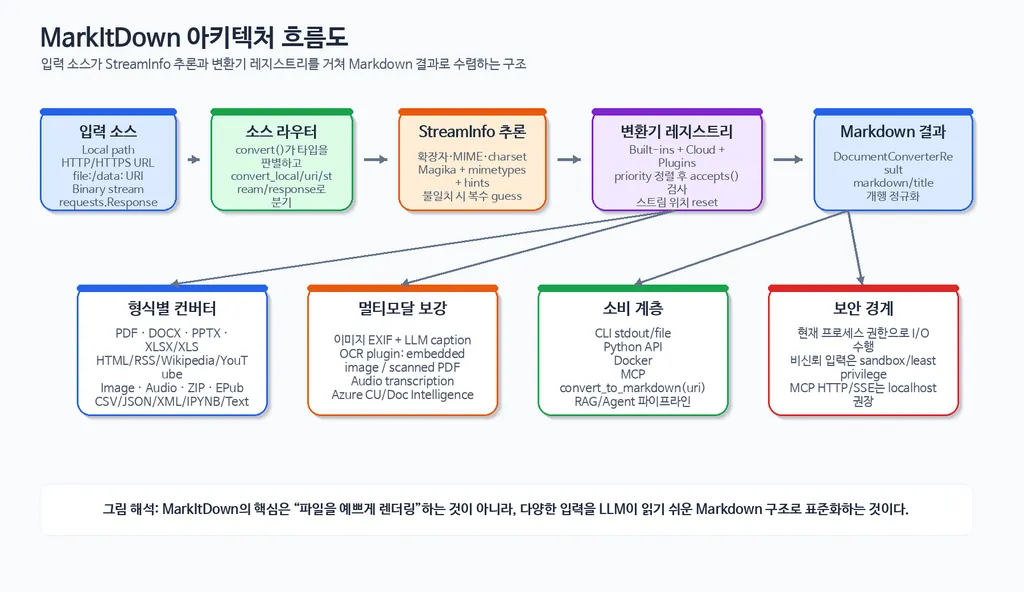
MarkItDown is moving beyond being a simple utility to becoming a core infrastructure for the environments in which AI agents operate.
In the past, humans had to manually open files and copy-paste text. Now, automated pipelines built with MarkItDown can convert thousands or tens of thousands of documents into Markdown in an instant, supplying them as training data for LLMs or indexing data for RAG (Retrieval-Augmented Generation) systems.
In particular, this tool is very easy to deploy in API form when combined with web frameworks like FastAPI. This plays a decisive role in allowing companies to build their own "document conversion services" or upgrade internal Knowledge Management Systems by connecting with workflow automation tools like Zapier or n8n.
Ultimately, we are in an era where how well you "refine" data determines the intelligence of the AI. MarkItDown drastically reduces the cost of that refinement process and creates an environment where data scientists can focus on more valuable analysis and modeling.
Closing: Is Your Workflow Ready?
So far, we have taken a deep dive into Microsoft's innovative tool, MarkItDown.
To summarize, this tool is a powerful preprocessing utility that easily converts various formats—such as PDF, Office, and media—into Markdown, which AI prefers most. It will be the best choice for anyone looking to simplify complex data pipelines and maximize the efficiency of AI agents.
If you are struggling in the swamp of data preprocessing, why not put the light yet powerful MarkItDown into your toolbox instead of heavy, cumbersome tools?
How are you currently preparing data for your AI models? If you have any special data preprocessing tips of your own, please share them in the comments!
References
- markitdown · pypi.org
- Deep Dive into Microsoft MarkItDown · dev.to
- MarkItDown, Microsoft가 공개한 PDF, 이미지 및 오피스 문서 ... · discuss.pytorch.kr
- MarkItDown : MS 의 문서 파일 변환 도구 (to Markdown) · 42morrow.tistory.com
- MarkItDown · marketplace.visualstudio.com