Attaching a generation workflow to the INERIT blog meant I wanted to create the representative image at the same time. Even with the body text complete, if the thumbnail had to be created and uploaded separately, the final step would still remain in human hands. Since the articles are offered in multiple languages, the text within the images also had to match the respective language.
Codex, which I was already using, could generate images. This led me to wonder: Could I call this functionality from the blog server as well?
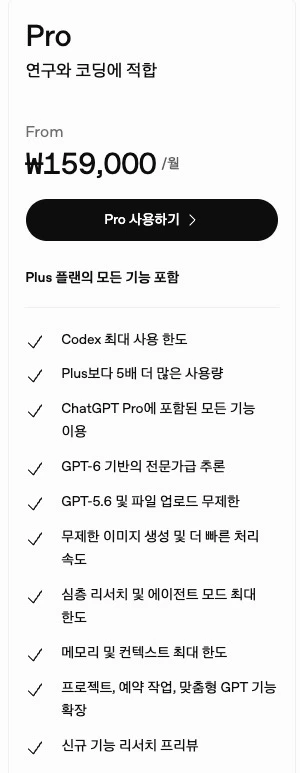
ChatGPT Pro product information screen. The execution path implemented in this article is the Codex CLI.
Ultimately, I placed the Codex CLI logged in via a ChatGPT account and an HTTP server in a single container. When the blog requests an image operation, a worker runs the CLI, receives the generated file, and uploads it to the blog repository. From the blog’s perspective, it looks like an image generation API is being called, but what actually runs inside is the logged-in CLI. This image operation is handled by the Codex subscription usage rather than consuming a separate Image API credit. The core achievement was enabling the blog to call a feature I was already using.
This article covers the behavior verified while establishing this connection and the process of changing the workflow so that a failed thumbnail does not require recreating the entire article. The production versions verified are Codex CLI 0.164.0 and Node.js 24, with the verification date being November 5, 2026.
First, I verified the login method and the actual image files
Codex offers a login method via ChatGPT subscription and an authentication method using an API key. This implementation uses the former. The key given to the blog is an app key for accessing a custom HTTP server, while the Codex login credentials are managed separately within the server, separating the two authentication methods. Official authentication documentation
Official documentation states that built-in image generation is included in general Codex usage limits. Additionally, codex exec allows reusing saved CLI authentication, and --json enables emitting execution events. Connecting these two features suggested they could be handled by a server. Image generation documentation, Non-interactive execution documentation
However, the mere fact that a command can be executed does not guarantee that image generation works. The critical verification was whether the built-in image tool is invoked during the server’s non-interactive execution and whether an actual result file is produced.
In the running version, this path successfully yielded a PNG. The worker obtains an execution ID from the thread.started event of codex exec --json and collects the result from the CODEX_HOME/generated_images/<thread-id> directory of that execution.
I did not set the model’s final answer as the success condition here. A sentence like “I created the image” or just a process exit code cannot guarantee the existence of a file for the blog to attach. The image operation is treated as successful only if the PNG for that execution exists and passes file format and size checks. When converting to a specified size, actual image decoding is also performed.
The path in generated_images and the event handling method reflect behavior verified against this version’s implementation. This is also the reason for pinning the CLI version.
I attached a small task API in front of the CLI
I did not have the blog handle the CLI’s output or login files directly. I defined only the necessary requests for the Node.js server and structured it so that the CLI runs inside.
The call flow is as follows:
블로그 워커 → 내부 HTTP API → Codex CLI → PNG 검증 → 블로그의 WebP 저장
The image API and the CLI run in the same container. This makes it easy to retrieve generated files and pin the CLI version and execution environment together. Only the necessary values, such as the prompt, resolution, and task status, are exposed to the blog.
The request format was defined as follows. The paths and parameters below are the specifications of the custom wrapper.
POST /images HTTP/1.1
Authorization: Bearer <internal-app-key>
Idempotency-Key: <saved-request-id>
Content-Type: application/json

{
  "prompt": "블로그 썸네일. 터미널에서 이미지 작업이 실행되는 장면. 큰 한글 제목은 'Codex로 썸네일 자동화'.",
  "size": "1920x1080",
  "effort": "medium"
}
Instead of holding the connection open until the image is complete, the server returns HTTP 202 and a task ID. The blog checks the status via GET /images/{id} and, upon success, receives the PNG via GET /images/{id}/file. The same app authentication is required for status checks and downloads.
I also implemented a compatible path that returns a synchronous response, but the blog uses the method that receives a task ID. Even if generation takes time or the blog process restarts, it must be possible to identify which task was being awaited.
For CLI execution, I used Node.js’s spawn(). Commands and options are passed as an argument array and executed with shell: false, while the image description is passed via standard input. Prompts are not appended to shell command strings.
Additionally, I limited the worker’s environment variables to the necessary items. I did not pass the blog’s app key or separate OpenAI API key to the CLI child process as is, and disabled shell, app, and plugin tools not needed for image generation. This worker’s only job is to create one image using built-in tools.
I could not rewrite the article just because the thumbnail failed
I paid more attention to what happens after a failure than to creating a single image.
If text and body images are ready but an error occurs during thumbnail generation or storage, restarting from the beginning repeats work already completed. The newly rewritten body text might differ from the previous version, and image generation might be duplicated.
Therefore, I ensured the blog’s thumbnail step preserves the following information:
- The finalized image prompt and references
- The request ID sent to the image server
- The task ID returned by the image server
- Image bytes generated but not yet uploaded to the repository
The next step depends on where the failure occurred. If the task was accepted by the image server but the connection was lost before receiving a response, the system looks for the already accepted task using the same request ID. If the PNG was received but only the repository upload failed, it retries the upload with the stored bytes.
For this, I used Idempotency-Key. If the same app sends the same key and request content again, it returns the existing task; if the same key sends different content, it returns a 409 error.
However, this alone was insufficient for recovery. If image size or prompt settings change between server restarts, the request reconstructed by the blog might differ from the original submission. This could cause a conflict with an already accepted task.
Therefore, I added a lookup path to find tasks by request key.
GET /images?request_id=<saved-request-id>
Authorization: Bearer <internal-app-key>
The blog checks this path first, even if there is no saved task ID. If an existing task is found, it resumes with that result; only if none exists does it send a new request. This distinguishes between resending a reconstructed past request with current settings and locating the past request itself.
Of course, if the image worker process itself terminates, the situation differs. Queued tasks are restored, but tasks interrupted during execution are terminated with interrupted. It is not guaranteed that a terminated CLI execution can be resumed directly. Even if a new image task is required, the blog’s body text and results from previous steps remain.
Resolution and references were part of the custom API contract
Besides the prompt, I had to define which parameters would be accepted. Since the blog does not need to request multiple images at once per article, one request was limited to generating one image.
| Parameter | Meaning in this wrapper |
|---|---|
prompt | Content and composition of the image |
size | Width and height of the final returned file |
effort | Codex reasoning effort setting |
reference_images | Reference image attached when necessary |
transparent_background | Transparent background request |
In particular, size and effort are easily misunderstood if judged by name alone.
size: "1920x1080" refers to the size of the returned PNG. It first requests generation at that aspect ratio, but since the built-in tool might return a different size, the server adjusts the final dimensions. If the original aspect ratio differs, it crops and resizes around the center, which may cut off text or subjects at the edges. The generation prompt also requests safe margins, and when checking thumbnails, composition must be reviewed alongside size. This setting does not guarantee the model’s native generation resolution.
effort connects to Codex’s model_reasoning_effort. I did not treat it as the same value as a quality tier in an image API.
References are used selectively. They help when the actual product or interface shape matters, but there is no need to force unrelated photos onto abstract development topics. The blog examines the actual content of candidate images to decide whether to use them, passing only the selected file to the worker.
Instead of accepting remote image URLs or arbitrary file paths, the server receives and validates PNG, JPEG, or WebP bytes up to a limited size. These are stored in the task directory and passed to the CLI’s --image input and the built-in tool’s reference path. The current implementation limits this to a maximum of 5 images. This number is a restriction aligned with the running Codex built-in tool and does not assume it is the same as the official Image API’s input limit.
The completed PNG is converted to WebP by the blog and stored in object storage. The current conversion quality is 85, and if the longer side exceeds 3840 pixels, it is downscaled. Readers’ browsers read this stored image, so Codex is not called every time the page is opened.
In Kubernetes, I persisted login and task states
Simply installing the CLI in a container does not maintain the subscription login. If authentication info is lost when a pod is replaced, image generation stops until logging in again.
I placed an account-specific CODEX_HOME on the server and stored it on a persistent volume. For logging in on a headless server without a browser, I used device code authentication.
codex login --device-authWhen the user opens the address shown by the server in their browser and enters the code, the login result is saved in that CLI environment. Since the login file is a credential, it is not included in the container image or Git repository. Official authentication documentation also explains this method and file handling standards. Logging in in a headless environment
The key given to the app and this login file also have different lifespans. Rotating the blog’s call key does not require re-logging into the Codex account. The image server stores a hash of the app key and separates task and file access by request owner.
The current image server is a single instance using a file-based queue. The Kubernetes deployment also uses a single replica and an Recreate strategy, with file locking to prevent two processes from operating the same data directory simultaneously. This configuration involves a brief interruption during deployment. I did not consider it a structure that scales safely just by increasing the HTTP server replica count.
Limits were also set on concurrency and queue depth. When usage limits are reached, it is handled as a waiting state, and generation timeouts and retry counts are limited. Cases where the safety system blocks the composition are distinguished from general transient errors in the response.
What changed after integrating with the blog
Currently, the blog creates thumbnail guidelines from the article title and body, selects references if needed, and calls this internal API. When the generated image is saved as WebP, it is linked to the article; if an error occurs, the state of the thumbnail step is preserved. It is now possible to resume image work without rewriting the body text.
While reviewing the implementation, I also ran 14 automated tests for the wrapper. These check duplicate request handling, queue recovery after restarts, interrupted execution states, file access by request owner, reference input limits, actual PNG collection, and size conversion. These tests verify server behavior by replacing the generator with a mock, and not all tests involve actually generating an image with OpenAI.
Subscription limits remain an operational condition. Official documentation states that built-in image generation can consume inclusion limits 3–5 times faster on average than similar tasks without images. Therefore, to increase throughput, generation time and remaining limits must be monitored together. The official programmatic path for image generation is the Image API; what is described here is a CLI wrapper configured for my blog. Image generation and usage limits
I learned about the API credit benefit after implementing this
While organizing this article, I also learned that eligible Pro subscriptions can link their owned API organization to receive API credit benefits. These credits can also be used with the official Images API. To use the benefit, conditions such as API organization connection and activation must be met. API credit information for subscribers
This newly discovered option and my current implementation use different limits. Calling the official Image API with API credits deducts from those credits. My wrapper runs the built-in tools of the logged-in Codex, so it does not consume separate Image API credits.
With this configuration, I can now use my existing Codex usage limits for blog image generation, independently of the API credit balance. Knowing that the official API and subscription login consume different usage quotas creates another path to choose based on the nature of the task.
This can also be applied to tasks that can wait, like translation
INERIT blog thumbnails do not need to be generated the moment a reader opens the page. The work can be delegated during the publishing preparation stage and the result saved. Unlike chat services requiring immediate responses, there is room to wait for the generation order.
Multilingual translation is also worth exploring from the same perspective. One could place the source text and target language in a task queue, verify the title and body returned by the CLI, and apply them as translations. If code blocks, links, quotes, and numbers are checked for preservation, and only failed languages are reprocessed, there is no need to recreate the original article. Applying this path to translation is a verification task not yet implemented.
However, moving to the CLI does not reduce the tokens required for translation itself. If tasks were previously handled by a paid API, shifting some to subscription usage offers the potential to reduce usage and costs billed on a separate API. In return, one must manage Codex limits, wait times, result verification, and retry operations. I have not measured a reduction in token count or cost for current blog translations.
What I actually connected this time is the thumbnail. The blog requests image work via an internal API, Codex generates it in a subscription-logged-in environment, and the blog saves the result file. What was needed was not a single fast response, but an image that could be awaited and used, and a task state that persisted even after failure. Thanks to these conditions, I could utilize Codex’s subscription features like an API in the blog.