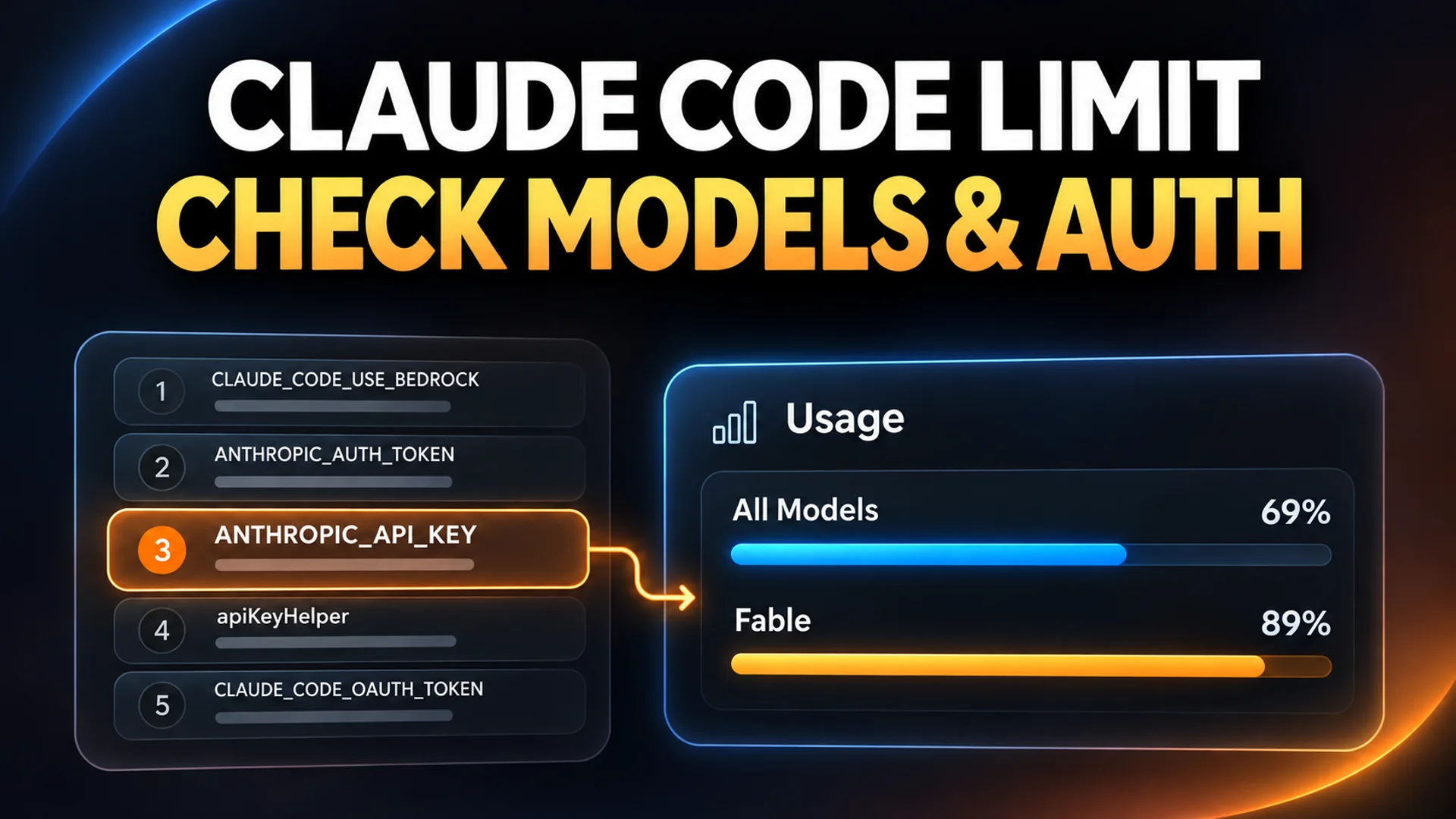
You do not need to migrate all your workloads to the API just because you hit a usage limit in Claude Code. The situation changes if you first check whether the current session is consuming subscription limits or being billed via an API key using /status. This is not about bypassing limits, but rather about understanding model-specific restrictions and authentication priorities to minimize workflow interruptions.
Limits are calculated in three separate categories
Usage limits in Claude Code are divided into three types, and each is consumed independently 1.
- Session limit: A short-term restriction that resets every five hours.
- Weekly total limit: Calculated by aggregating usage across all models on a weekly basis.
- Weekly model-specific limit: Top-tier models have an additional weekly restriction 1.
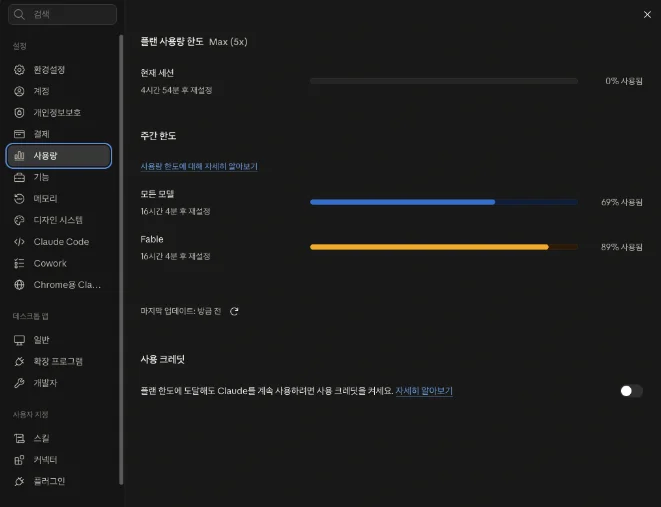
Without understanding this structure, it is difficult to grasp the full situation when the message says "limit reached." According to real user observations, there have been cases where Max 5x plan users displayed the following on their screens: session limit at 4%, weekly total limit at 69%, and weekly model (Fable) limit at 89% 2. This means that even if the limit for a specific model is nearly exhausted, there may still be remaining capacity in the total weekly limit.
Additionally, usage from web chat, desktop apps, and Claude Code is aggregated into the same limits 2. Heavy use of Claude chat reduces the remaining amount available for coding tasks. Conversely, complex tasks involving multiple sub-agents can exhaust weekly limits before the five-hour session resets 1.
Cases where switching models allows work to continue
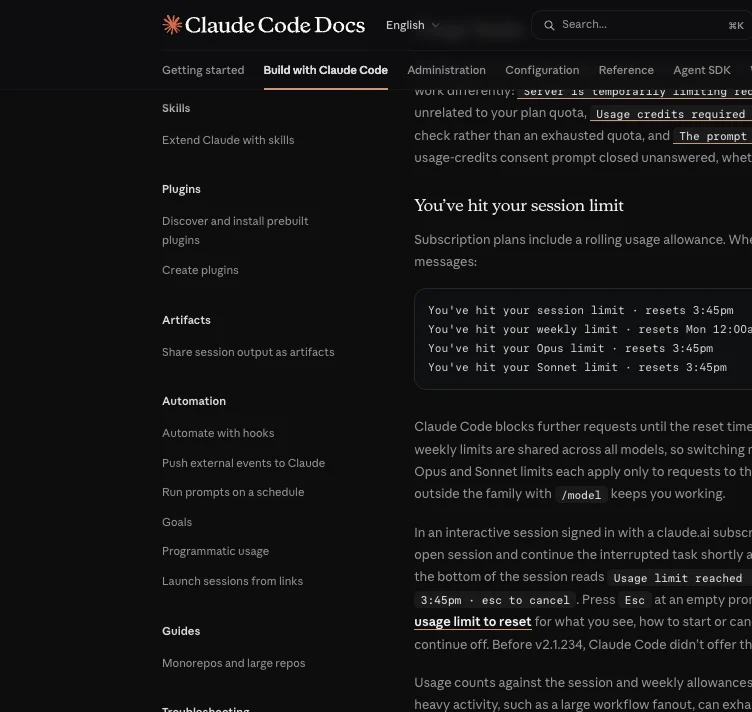
When a limit is reached, the first thing to check is which limit has been reached.
When only a model-specific limit is reached
If you have reached the separate weekly limit applicable only to top-tier models (such as Opus, Sonnet, or Fable), you can switch to a different model family in your Claude Code session using the /model command and continue working immediately 1. As in the previous example, if the weekly model limit is 89% but the weekly total limit is 69%, you can switch to another model with available capacity and continue working within the total limit 2.
However, there is a point to be aware of. Prompt caching is separate for each model, so the first request immediately after switching will re-read the existing conversation content without cache. This processing cost may occur once in long conversation sessions 3.
When a session or weekly total limit is reached
Session limits and weekly total limits are shared by all models. Therefore, if these two restrictions are reached, the task remains blocked even if you switch to a lighter model 1. However, using a lighter model than usual can slow the rate at which limits are exhausted.
'Usage Credits' are a transition to pay-as-you-go, not a reset option
To continue working in session or weekly limit zones that cannot be resolved by switching models, you can use the 'Usage Credits' feature.
This feature is easily misunderstood by its name. It does not initialize the already exhausted limits. According to Anthropic customer support documentation, Usage Credits allow you to "switch to pay-as-you-go pricing after reaching the plan's usage limit, so you can continue working" 3. In other words, it is a switch that changes the billing method to standard API rates instead of blocking access.
Utilizing the automatic resume feature
Waiting without using credits is also an option. Starting with Claude Code version 2.1.234, the feature to wait until the reset time and automatically resume work is enabled by default 3.
- If you leave the session open, a message such as
Usage limit reached · continuing automatically at 3:45pmappears at the bottom, and stopped tasks are automatically resumed at the reset time. - If the computer has been asleep for more than 30 minutes, you must press
Enterto resume. - Automatic resume does not occur if more than 24 hours remain until the reset, as with weekly limits, or if running in the background 3.
If you enable Usage Credits, charges are billed separately from your subscription fees. Because Claude Code sends the entire conversation for every request, token costs can increase with longer conversations. It is recommended to set monthly spend limits in advance to prevent unexpected expenditures 3.
7-step authentication priority determines the billing path
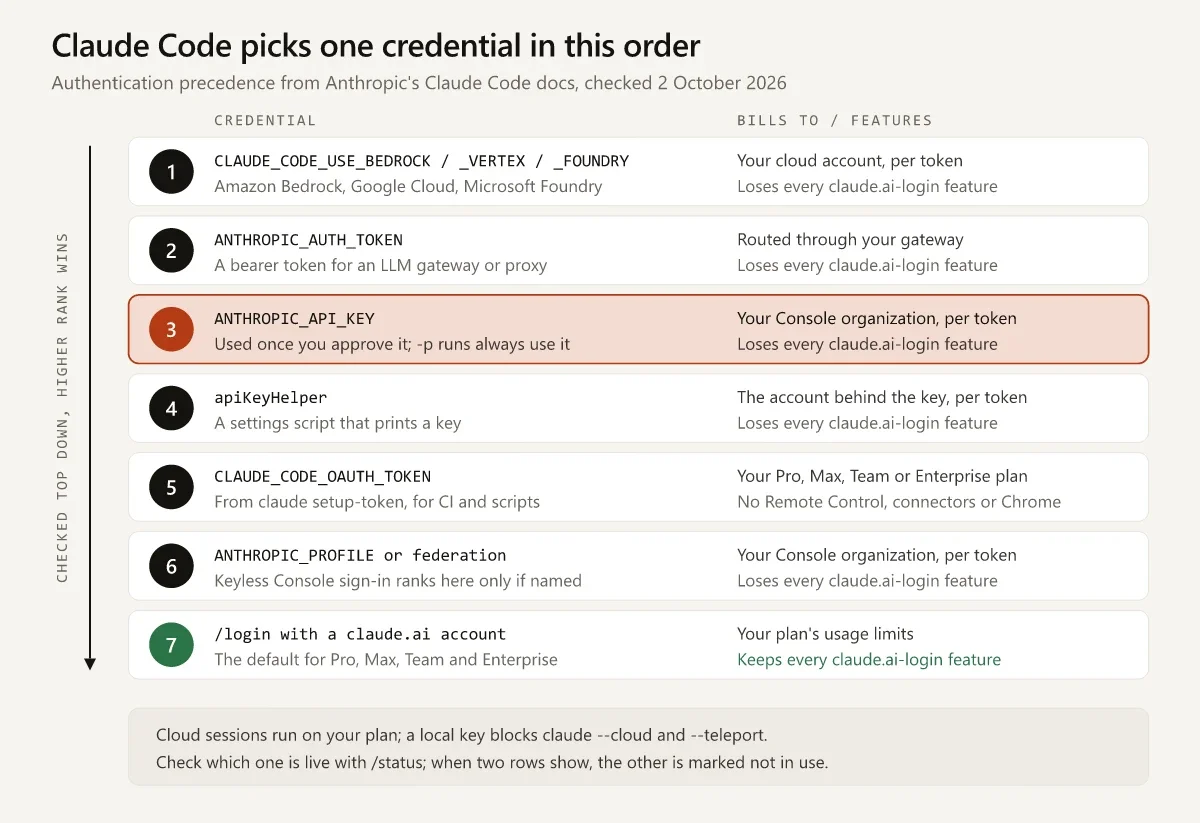
In environments using both subscription and API keys, the billing path is often unintentionally set to the API. Claude Code does not automatically switch paths but selects the one with the highest priority among the configured credentials.
As of October 10, 2026, the priorities documented in the authentication docs are as follows 4.
| Order | Configured Credential | Billing Path |
|---|---|---|
| 1 | Cloud provider variables such as CLAUDE_CODE_USE_BEDROCK | AWS, Google Cloud, Azure accounts |
| 2 | ANTHROPIC_AUTH_TOKEN | Gateway/proxy that issued the token |
| 3 | ANTHROPIC_API_KEY | Console API credits (prepaid) |
| 4 | apiKeyHelper script | Organization of the key returned by the script |
| 5 | CLAUDE_CODE_OAUTH_TOKEN | Subscription plan usage (manual token) |
| 6 | Profile/federation credentials | Issuing organization |
| 7 | /login subscription OAuth | Subscription plan usage (default) |
If ANTHROPIC_API_KEY (step 3) remains in environment variables, and you are logged into the subscription (step 7) via /login, requests are processed by the API key.
- Interactive mode: Claude Code asks once whether to use the API key, and if approved, that choice is remembered 4.
- Non-interactive mode (
claude -p, CI, etc.): Always uses the API key without confirmation 4.
This is why costs incur API charges for background automation scripts while interacting on a laptop uses the subscription. To check which credentials the current session is using, enter /status in Claude Code. If both login information and an API key exist, the unused side is displayed as 'disabled' 4.
Running scripts under subscription limits: setup-token
If you want to process automation tasks within subscription limits without incurring API costs, you can use claude setup-token. This command generates an OAuth token for subscription authentication; the generated token is only displayed on the screen and is not saved.
# 1. 토큰 발급 후 복사
claude setup-token

# 2. 환경 변수에 저장하고, 기존 API 키는 삭제하여 우선순위 충돌 방지
export CLAUDE_CODE_OAUTH_TOKEN="복사한_토큰"
unset ANTHROPIC_API_KEY

# 3. 구독 한도로 실행 확인
claude -p "테스트 실패 원인을 요약해 줘"
Here, unset ANTHROPIC_API_KEY is important. Since ANTHROPIC_API_KEY (step 3) has higher priority than CLAUDE_CODE_OAUTH_TOKEN (step 5), API charges are still billed if the API key remains 4.
Model separation configuration via proxy
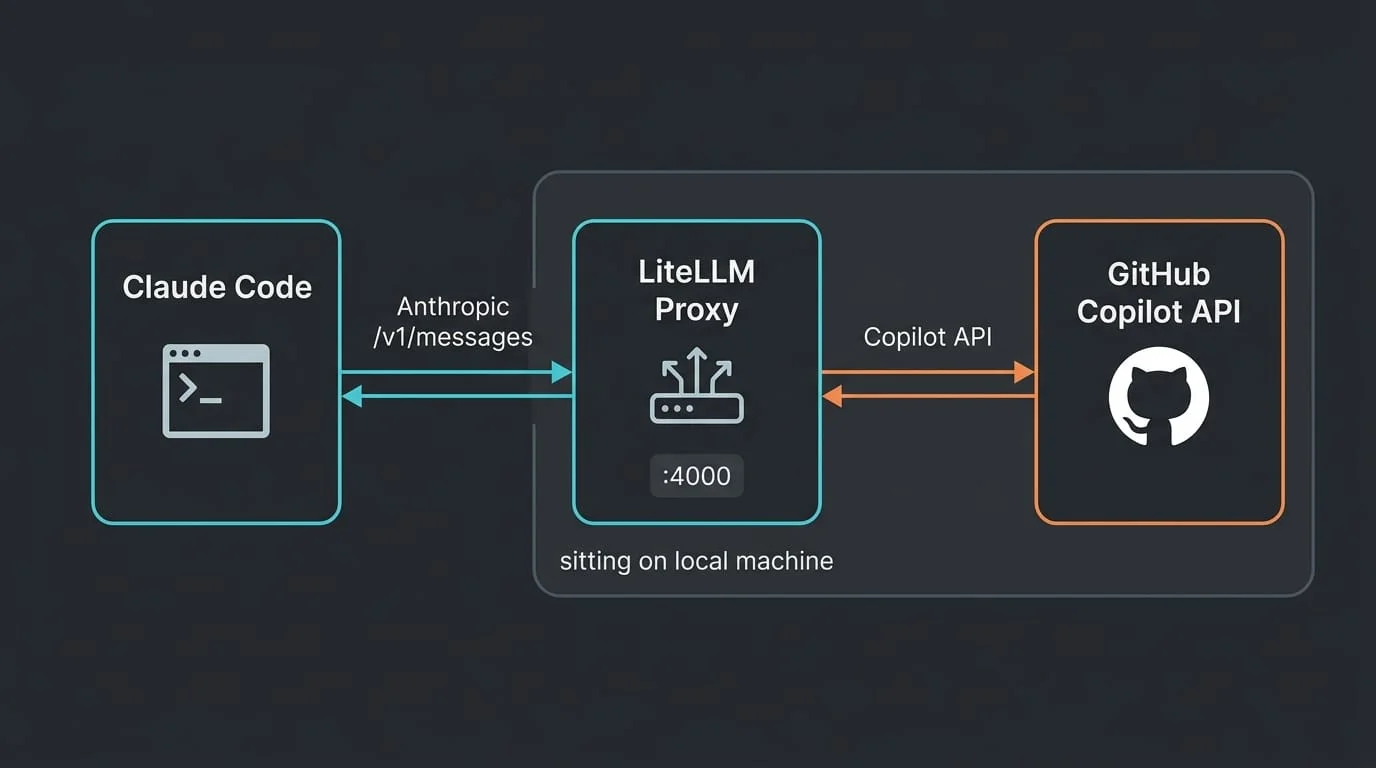
Separate from limit management, if you want to assign models based on task type, you can utilize proxies such as LiteLLM. By setting Claude Code's ANTHROPIC_BASE_URL to the proxy server address and inserting the issued virtual key into ANTHROPIC_AUTH_TOKEN, requests are routed through the proxy 56.
This method allows configurations where expensive models (such as Opus) pass directly to the original API, while paths for cheaper models (such as Haiku) are mapped to alternative models like DeepSeek 75. This allows operating in a way where costly main conversations use higher-tier models while maintaining Claude Code's internal sub-agent functionality 7. However, note that when using a proxy, ANTHROPIC_AUTH_TOKEN is priority step 2, so charges are billed to the gateway operator rather than the subscription 4.
Conclusion: Start by checking the current path with /status
Limit management in Claude Code is not simply about controlling usage volume, but about controlling which credentials are used to send requests. If blocked by model-specific limits, switching to another model via /model is possible. If it is a session or weekly total limit, you must either switch to pay-as-you-go via credits or wait for automatic resume.
The first thing to do is open /status to confirm whether the current authentication method is subscription or API key. If billing is going through the API contrary to intent, trace whether keys are being injected from shell environment variables, the .env file, or settings.json.
References
- 클로드(Claude) 사용량 리셋 시간 정리: 5시간 세션 한도·주간 한도 리셋 규칙, 사용량 확인, 한도 걸렸을 때 선택지 · techworklog.com↩
- 클로드 코드 사용량 한도, 세션·주간·모델별로 따로 찬다 · sylabkr.com↩
- ↩
- Claude Code API 키와 구독 결제: 키를 승인하면 API 과금, -p는 항상 키 · blog.laozhang.ai↩
- Claude Code Quickstart | liteLLM · docs.litellm.ai↩
- Claude Code (CLI) | liteLLM · docs.litellm.ai↩
- 클로드에 딥시크 물부어먹는법 · gall.dcinside.com↩