Do you know what the first wall you encounter when working on data engineering or AI projects is? It is the massive barrier known as 'unstructured data.'
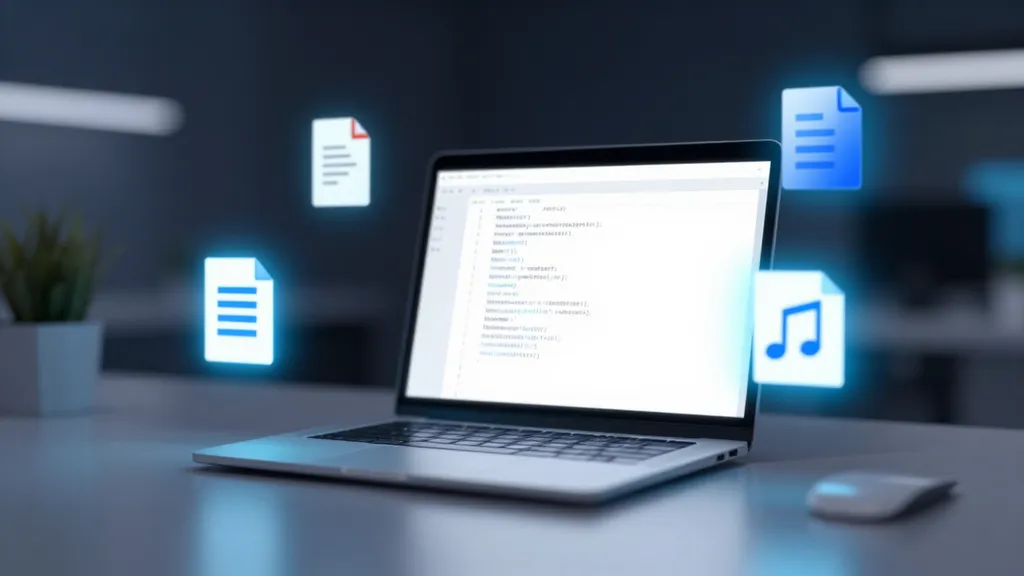
PDFs, Word documents, Excel files, and even images and audio... the information we possess comes in so many different forms. However, the data that Large Language Models (LLMs) consume most "deliciously" is neatly organized 'text.'
To bridge this gap, countless developers have spent sleepless nights writing parsing code. But as of 2026, a single tool released by Microsoft called MarkItDown is solving this tedious, repetitive task in one fell swoop.
25,000 Stars in Just 2 Weeks: Why are developers worldwide raving about it?
There has been a recent event heating up the open-source ecosystem. MarkItDown, a Python-based utility released by Microsoft, has exploded in popularity, surpassing 25,000 GitHub stars just two weeks after its launch.
Is it simply because of the news that "a file converter has arrived"? No. The core of this tool lies beyond simple conversion; it lies in 'AI-friendly data structuring.'
We often go through complex preprocessing stages to make PDF or Word documents readable by AI. Issues such as broken table structures, blurred text within images, or lost heading information occur frequently. MarkItDown was designed specifically to solve these problems.
Instead of simply extracting text, this tool preserves structural elements such as Headings, Lists, Tables, and Links in Markdown format. Why Markdown, specifically?
The reason is clear: the latest LLMs, such as GPT-4o, have been trained to understand Markdown format very naturally. Markdown can be described as an 'AI-specific language' that is highly token-efficient—saving costs while delivering the document's context most accurately.
The Incredible Spectrum Supported by MarkItDown
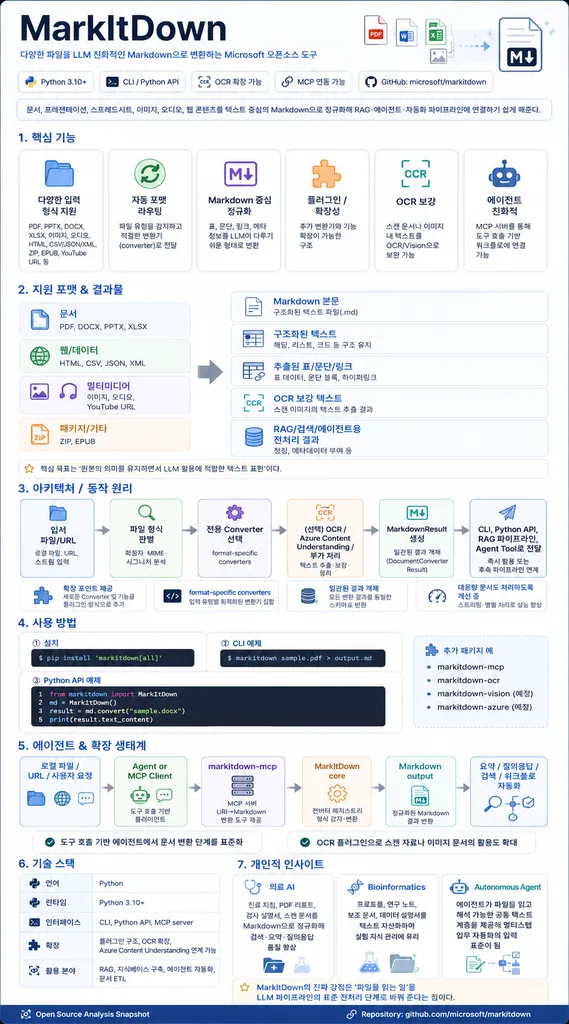
The true terror of MarkItDown lies in its 'versatility.' Like a polyglot interpreter who speaks every language, it translates almost any type of data into Markdown.
The range of supported file formats is jaw-dropping.
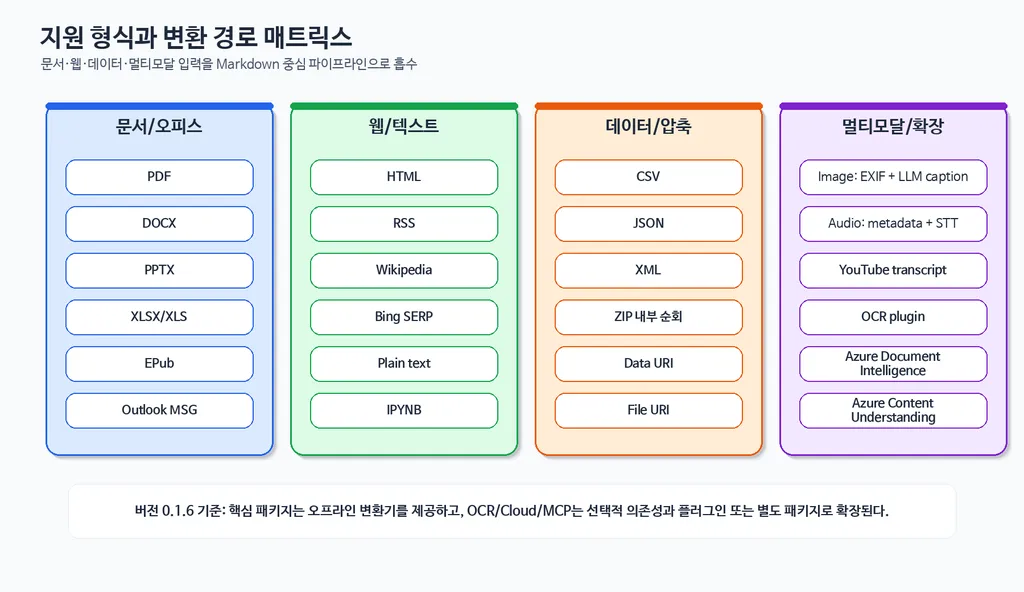
- Documents & Office: It supports PDF, Word (DOCX), PowerPoint (PPTX), Excel (XLSX), EPubs, and even HTML.
- Media Data: For image files, it not only extracts EXIF metadata but can also describe the contents of the image using LLM vision capabilities. For audio files, it even features Speech-to-Text (STT) functionality.
- Other Data: It handles structured data like CSV, JSON, and XML, and can even recursively process contents within compressed ZIP files. It even provides a feature to fetch the content of a video if you provide a YouTube URL.
One interesting point here is that this entire process is designed to be highly modular. For example, audio conversion utilizes Google APIs, while Office documents are converted to Markdown through libraries like Mammoth or Pandas. Thanks to this flexible architecture, developers can pick and choose only the functions they need or extend the tool by adding their own custom plugins.
Of course, it is not perfect. As with all OCR (Optical Character Recognition) solutions, there may be limits to perfectly reproducing the layout in documents where tables, footnotes, and figures are intertwined, such as complex academic papers. However, in terms of building general-purpose data pipelines, MarkItDown shows much greater efficiency than using individual parsers.
Practical Application: Building an AI Data Pipeline with Just 4 Lines of Code
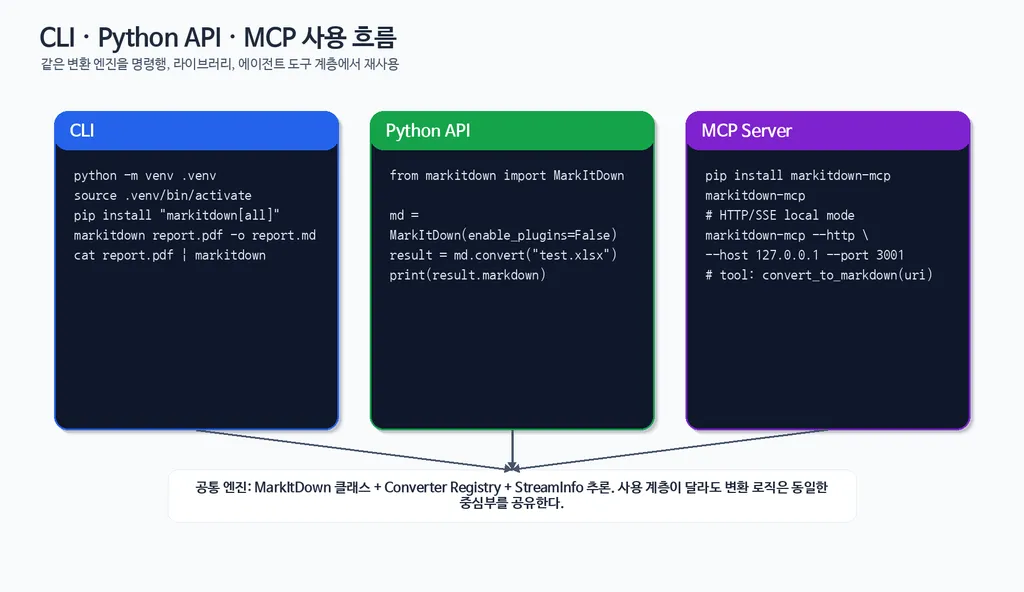
You might understand that "the tool is good," but you're probably wondering how to actually use it. The greatest charm of MarkItDown is its 'overwhelming simplicity.' You can convert files with just 4 lines of Python code without any complex configuration.
First, installation is very simple. Open your terminal and enter the following command:
pip install 'markitdown[all]'If you are concerned about disk space, you can selectively install only the features you need. For example, if you only need PDF and Word, you can install it via pip install 'markitdown[pdf, docx]'.
In actual Python code, it is used as follows:
from markitdown import MarkItDown

md = MarkItDown()
result = md.convert("your_document.pdf")
print(result.text)
This short snippet performs the magic of calling numerous libraries internally to analyze complex PDF structures and convert them into Markdown.
Additionally, since this tool supports a CLI (Command Line Interface), there is no need to write Python code at all. You can just fire off a command directly from the terminal.
markitdown path-to-file.pdf -o document.mdIf you are building a RAG (Retrieval-Augmented Generation) system, this tool will be your best ally. By converting unstructured data into structured Markdown, it helps reduce noise during AI retrieval, allowing it to produce much more accurate answers.
Furthermore, if you combine it with FastAPI to create a simple API server, you can integrate it with automation tools like Zapier or n8n to build automated workflows such as "automatically converting an uploaded file to Markdown and passing it to an AI."
Security, Scalability, and Precautions
Just because it is a Microsoft tool does not mean you should blindly trust it is "safe." As a professional, there is one security precaution I must point out.
MarkItDown uses the permissions of the currently running process. In other words, just like using the open() function or requests.get(), it can access any file and resource that the process has access to. If you are working in an environment where you are converting files from untrusted sources, you must implement a process to sanitize the input. To reduce risk, it is wise to use the convert_stream() or convert_local() functions which limit the scope.
Also, caution is required when processing image-based PDFs. With default settings, it may not perfectly read the text within the images. In such cases, you should connect a multimodal model like OpenAI's gpt-4o to activate Vision capabilities. This allows the AI to see and describe the contents of the image or provide high-level OCR functionality to extract text.
However, the resulting API costs and speed issues are something you must balance appropriately according to your project's circumstances.
Summary: A New Standard for the AI Era

So far, we have taken an in-depth look at Microsoft's innovative tool, MarkItDown.
Beyond being a simple file converter, this tool acts as a 'gateway for data' that extracts value from unstructured data and delivers it to AI.
- Versatility: It converts almost all formats, from PDF to audio and YouTube, into Markdown.
- Efficiency: It increases LLM comprehension and optimizes token usage through the Markdown format.
- Scalability: It can be infinitely expanded to meet developer needs through its Python library, CLI, and plugin architecture.
As of 2026, if you are considering AI-based knowledge search or document automation systems, MarkItDown is positioning itself not as an option, but as essential infrastructure. Instead of spending time on complex data preprocessing, invest that time into more valuable model design and service logic development.
What kind of data do you want to train an AI with right now? Or how would you like to apply MarkItDown to your project?
Please share your thoughts or questions in the comments!
References
- What is Microsoft MarkItDown and Why It Matters? - Xeynergy Blog · blog.xeynergy.com
- MarkItDown: Microsoft의 전천후 마크다운 변환 및 RAG 전처리 도구 · wikidocs.net
- MarkItDown : MS 의 문서 파일 변환 도구 (to Markdown) - AI 탐구노트 · 42morrow.tistory.com
- 복잡한 학술 문서(이미지, 표, 각주 포함...)에 대해 7개의 OCR ... · reddit.com
- MarkItDown - Visual Studio Marketplace · marketplace.visualstudio.com