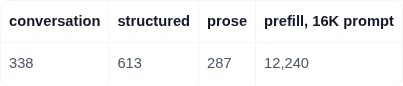
On a single RTX 5090, Inkling 2 Mini generated 338 tokens per second in short conversations and read a 16K-token input at 12,240 tokens per second. These figures were reported by Basalt’s developer. The model is advertised as supporting a context of up to 1 million tokens, but rather than loading a long input all at once, it adjusts how it uses space in the GPU’s memory. 1
The middle layers run three times for each token
To understand the speed figures, it helps to first look at how the model divides its computation. Inkling 2 Mini uses the middle 12 of its 24 layers three times. So while it has 24 layers with weights, layer computations are applied 48 times to process each token. At each layer, the model selects 8 of 128 experts to perform computations. This is a “sparse expert” architecture, in which only the experts needed are activated. 2
Repetition is a way to build a model by sharing weights, rather than adding more computations. That does not mean the actual amount of computation is small. According to the model card, the model has 26.4 billion parameters, with 5.4 billion activated per token when repetition is taken into account. Long-context processing and fast generation cannot be explained by this architecture alone; the inference engine’s execution approach also plays a role. 2
Basalt 0.5.5 is designed to run the small computational tasks in each layer consecutively during generation, while keeping expert weights on the GPU. It also handles input reading and answer generation differently. Inputs longer than 16 tokens are processed using tensor cores in batches of up to 4,096 rows. According to the developer’s description of the implementation, the input computation for NVFP4 experts uses two FP4 terms, representing values at roughly 8-bit precision. 1
A draft proposes multiple tokens, and the model checks them
Another feature that speeds up responses is the DSpark draft generator. While the main model selects tokens one at a time, the draft generator proposes up to 7 tokens in one pass. The main model verifies those proposed tokens before including them in the output. Basalt enables this feature by default, and it can be turned off by specifying --spec 1. 1, 3

Illustration
This difference matters when comparing speed. Basalt’s RTX 5090 benchmark was run with draft generation enabled, and reached 338 tokens per second in short conversations. On the same GPU, llama.cpp’s IQ4_NL GGUF generated 92–95 tokens per second on the same test. This comparison applies to that test setup; it is not a universal multiplier across all prompts or engines. 1
The release notes also describe tests comparing output with draft generation enabled against ordinary generation, to check that drafts do not arbitrarily change the results. They report that, across conversation, structured output, and prose tests with short and 16K inputs, draft-generated output matched ordinary generation. This verification applies to the test prompts and settings used. 1
As context grows, the cache and experts share GPU memory
When processing long contexts, the cache that stores conversation history takes up a substantial amount of GPU memory. This record grows with each token, so it needs more space as the conversation gets longer. By default, Basalt stores the cache in fp16. Using --kv fp8 switches it to fp8, reducing the cache’s memory footprint by nearly half. 1
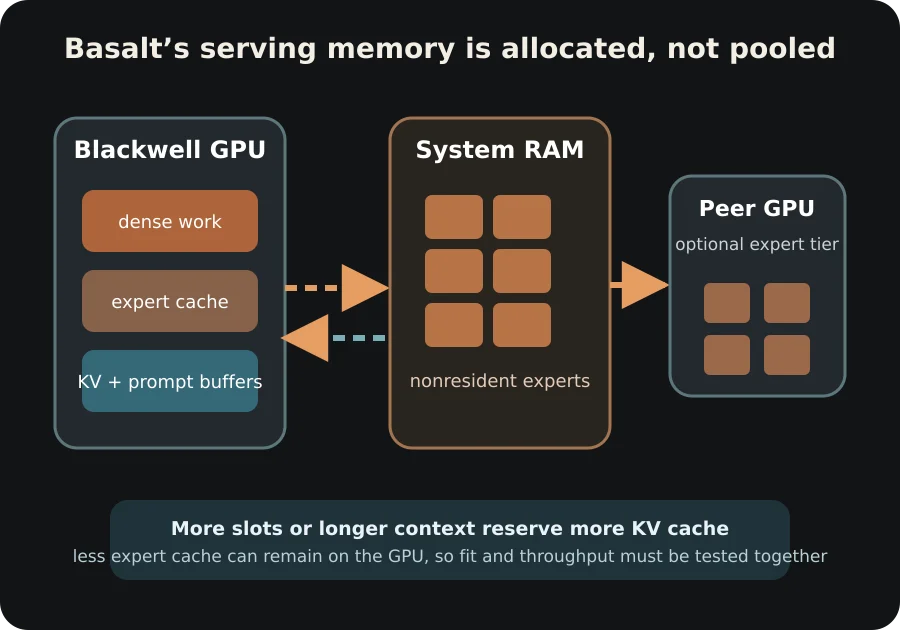
If the cache needs more space, Basalt moves less frequently used experts to pinned system RAM as needed. The long-context cache uses the freed GPU memory, while experts in RAM are read during generation. When the cache needs less space, the experts are copied back to the GPU. In other words, instead of keeping all experts on the GPU at all times, Basalt adjusts how experts and conversation history share space according to context length. 1, 3
In the published RTX 5090 measurements using this approach, ordinary generation with draft generation disabled reached 264 tokens per second in short conversations, 173 tokens per second with a 131K-token context, and 108 tokens per second with a 400K-token context. Reading a 400K-token input took about 97 seconds. The model runs with longer contexts, but generation is slower than in short conversations. 3, 1
“Supports 1 million tokens” does not mean the same speed
Basalt’s settings allow a context of up to 1,048,576 tokens. However, the published long-context speed figures go up to 400K tokens, and the available materials do not give a generation speed for a 1-million-token context. So the maximum context size alone should not be taken to mean that a conversation with 1 million tokens will get responses at the same speed as a short conversation. 3, 1

Illustration
The tests also separately checked whether the model could find information it needed in long contexts. Basalt’s release notes report that it found “needle” information placed at specific locations in 131K- and 400K-token inputs. These are search results for the tests described; they do not mean the model can recall every kind of information in every long conversation. 1
The published speeds are benchmarks run twice by Basalt’s developer on a single RTX 5090 at 400W. The 338 tokens per second in short conversations includes DSpark draft generation, while the 264, 173, and 108 tokens per second for long contexts are for ordinary generation without drafts. When comparing the figures, it is important to check both the context length and the generation method. 1, 3
The key to pursuing both fast responses and long contexts on a single RTX 5090 is not one number, but how the work is divided. For short answers, DSpark proposes tokens ahead of the main model; as the context grows, the fp8 cache and experts in RAM share GPU memory. So when reading speed figures, look beyond the “maximum context” and check whether the input length and use of draft generation match those of the measurement. 1, 3
References
- Releases · jesdga95/basalt · github.com↩
- Inkling 2 Mini Model Card · thinkingmachines.ai↩
- jesdga/Inkling-2-Mini-Basalt · Hugging Face · huggingface.co↩