"Why are my code results so different when I write them in Claude versus Cursor?"
This is a question a close junior developer recently asked me. Even though they are using the exact same Claude model, in one tool, the AI acts like a genius architect, while in another, it behaves like a beginner who can't even catch simple typos.
This question isn't merely asking about the performance difference between tools. It overlooks the fact that depending on what "hands and feet" you attach to the AI "brain," the AI can either be a simple chatbot or an autonomous agent capable of solving problems on its own.
Today, I want to talk about ECC (Efficient Context Compiler), the project I've been deeply immersed in recently, which has completely overturned my development workflow.
When Meeting a 'Foolish' AI with a Brilliant Brain

We often judge AI performance solely by the number of model parameters or the amount of training data. However, in actual coding environments, the problem is less about "how smart the model is" and more about "how accurately this model understands my project's context and how strictly it follows my rules."
This is precisely why ECC emerged. As of 2026, the trend in AI coding is shifting rapidly from "prompt-centric," where you simply input prompts, to "skill-centric," where the AI judges and acts on its own.
For example, suppose you say, "Implement a login feature." A typical AI will immediately start writing code. But an agent equipped with ECC is different:
- First, it checks the project's security rules. (Security)
- It identifies if existing test codes exist and which test framework is being used. (Memory)
- Before writing code, it suggests writing test cases first. (Enforcing TDD)
- It creates a plan to break down tasks and process them in parallel. (Orchestration)
This is the decisive difference between "just writing code" and "doing engineering."
ECC: Giving 'Intelligent Muscles' to AI Agents
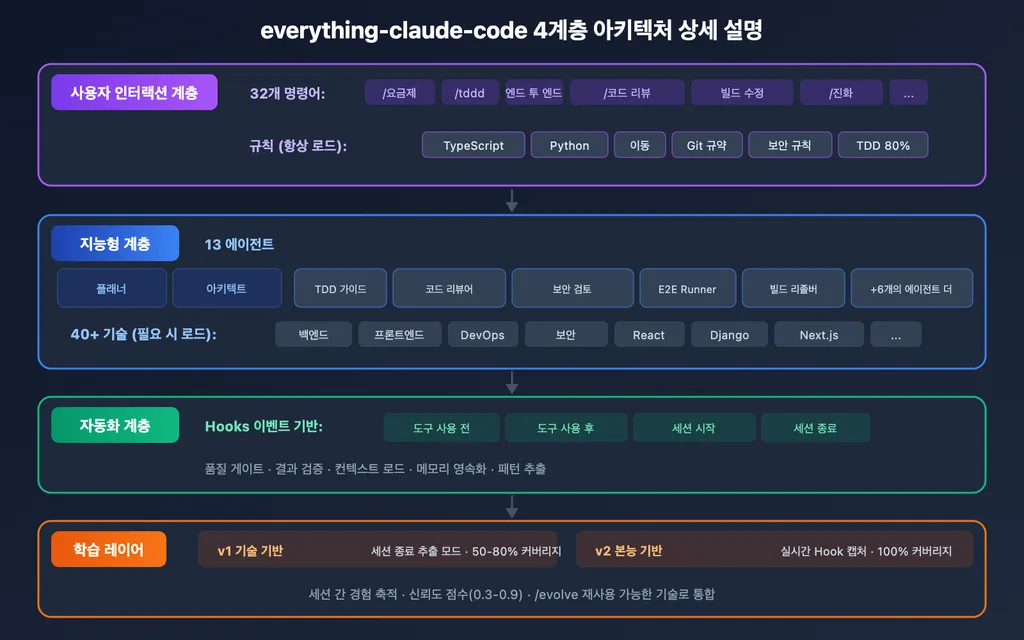
ECC is not a simple plugin. Having emerged as a GitHub icon with over 185,000 stars, this project is a harness-native operator system designed to allow AI agents to be deployed into actual product development.
The strength of ECC comes from five core pillars.
First is Skills. Through a vast set of over 300 skills, it allows the AI to freely handle ecosystems of more than 12 languages, including Python, TypeScript, and Rust. It goes beyond simple code generation to include debugging and architectural design.
Second is Instincts. It provides cognitive guidelines so that the AI selects predictable, optimal patterns when writing code.
Third is the most important: the Memory system. Don't AI models often forget previous content when conversations get long? ECC helps maintain the project context over the long term, allowing you to pick up exactly where you left off yesterday.
Fourth is Security. A security scanner called AgentShield detects secret leaks and blocks unauthorized configuration changes.
Finally, Research-first development. By forcing the AI to reference the latest documentation and research results before spitting out code, it drastically reduces "hallucinations."
In particular, the ECC v2.0.0-rc.1 version released in April 2026 has maximized the user experience. Through a new Tkinter-based dashboard GUI, it supports not only dark mode but also font customization, making developers feel as if they are sitting in an agent's control tower.
Is it All Rosy? Realistic Constraints and Precautions

Of course, like all technologies, ECC is not a perfect magic wand. This project is currently experiencing explosive growing pains.
Looking at GitHub issues, the realistic struggles developers face are clearly revealed. For instance, a critical bug (#2060) was reported where the gateguard-fact-force security feature of ECC 2.0 blocked all modification tasks in certain IDEs (like Cursor). This is a case where a feature intended to enhance security actually obstructed the development flow, and it is currently being urgently fixed under P0 (Critical) priority.
Additionally, compatibility issues—such as Node hooks failing due to path resolution problems in Windows environments or failing to find specific commands—persist. In other words, to master ECC, it is not enough to simply install it; you still need skilled engineering capabilities to understand and resolve these subtle cross-platform differences that occur during use.
Furthermore, the ECC Pro service for personal repositories incurs a monthly cost of $19. This is a point where one must weigh the freedom of open source against professional management services.
Becoming the '.editorconfig' of AI Coding

Looking at ECC, I thought, "This is the AI version of .editorconfig."
Just as developers in the past shared .editorconfig or Lint settings to align project styles and rules, we have entered an era where we share the rules and skills that the AI must follow.
ECC is designed to be compatible with various AI tools such as Claude Code, Cursor, and Codex. This means you are not dependent on a specific tool and can reproduce the "AI workflow" you want anywhere.
If you are a lead developer managing large-scale projects or an enterprise-level developer designing complex architectures, ECC will be a powerful weapon beyond a simple "coding assistant," serving as an "intelligent development agent platform."
Closing: Is Your AI a 'Tool' or a 'Partner'?

Ultimately, the core of technology lies in "how you utilize it."
Moving beyond the stage of being swayed by a single line of a prompt, granting the AI clear skills, establishing security guardrails, and sharing context through memory—this is the essence of "Agentic Development" that ECC aims for.
Rather than spending time simply looking for a smarter model, it is a much more productive approach to consider how to control and utilize that model.
Are you currently using AI merely as a 'tool' to execute commands, or are you nurturing it as a 'partner' that collaborates while following rules?
Please share your AI coding philosophy in the comments!
References
- ecc - Claude Code Plugin | ClaudePluginHub · claudepluginhub.com
- Issues · affaan-m/ECC - GitHub · github.com
- Everything Claude Code hits 100K stars: what developers should ... · augmentcode.com
- affaan-m/everything-claude-code Plugins · claudemarketplaces.com
- 자, 프롬프트 대신 Skills가 이해되셨다면 무지성 강추 드리는 플러그인 ... · threads.com
- 같은 클로드 모델인데 왜 결과는 다를까? 커서에서 클로드 ... - Instagram · instagram.com